How do I activate my NDIS plan and access the NDIS Portal?
Home / NDIS Resources HUB / How do I activate my NDIS plan and access the NDIS Portal?

How do I activate my NDIS plan and access the NDIS Portal?

Resource Author: Bianca S. | NDIS Expert   Last Updated: 11 March 2026
NDIS

What do I do with my NDIS Plan Activation Code?

When your plan has been approved you will receive a copy of your plan together with an Activation Code. This code allows you to create an account on the myPlace portal - the place where you will make all your online payment claims etc.

Follow these steps to activate your NDIS account on myPlace 

Has the NDIS sent you a message containing your Activation Code and you're wondering how on earth to get your NDIS Plan activated? Follow our step by step guide below.

Before you start you will need:

  1. A myGov Account (Don't have one? See how to create one)
  2. Your Activation Code
  3. Your phone that is registered with myGov account

Steps if you already have a MyGov Account

1. Go to the NDIS website

  • Go to the NDIS website: www.ndis.gov.au
     
  • Click on the Portal sign-in button (top right of screen)
     
  • Select myPlace participant portal from the drop-down menu
     

Portal sign in button


2. Sign in to the myPlace Portal with your MyGov details

  • Enter your myGov account details and click Sign in


myplace sign in


3. Enter Verification Code

  • You will need your phone handy as the NDIS will SMS you a verification code to enter here. This is to make sure it's really you.


Verify


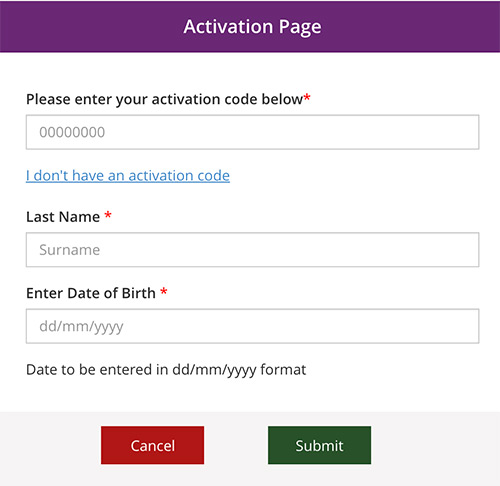
4. Complete your NDIS Activation Page

 Finally, you will be asked to enter:

  • the NDIS Activation Code sent to you by the NDIA
  • your Last Name and
  • your Date of Birth


activate


IMPORTANT: Your Activation code, is only valid for 10 days

If it has expired already, you can request a new one from the NDIS on 1800 800 110


Steps if you don't already have a MyGov Account

You will need to create a myGov account as your first step.

1. Go to the NDIS website

  • Go to the NDIS website: www.ndis.gov.au
     
  • Click on the Portal sign in button (top right of screen)
     
  • Select myPlace participant portal from the drop-down menu
     

Portal sign in button


2. Create a new myGov account

Before you start you will need:

  1. An email address (Don't have one? Create a free email account)
  2. Your Activation Code
  3. A mobile phone 

To start, click on the CREATE AN ACCOUNT button
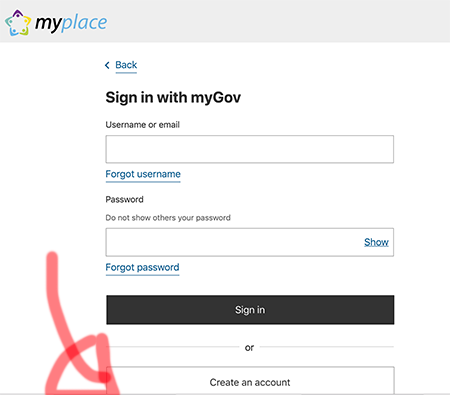
create mygov account

Now follow the steps that follow to create a myGov account.

There will be a number of steps to follow. Keep following the instructions until you get to the confirmation page.


Go back to Step 1 and login to myPlace.

MyCareSpace resources may be shared provided they are credited to MyCareSpace with backlinks to the original resource.

FREE service

We help you find Therapies in your area

Therapy, Social Options, Capacity Building

Tap here to start
FREE service

Connecting you with skilled NDIS support workers

We will find you verified providers with immediate availability.

Tap here to start

Share this resource

Therapy Finder – Free Service

Our Connections Team at MyCareSpace are linked in with a range of providers offering telehealth services with availability. Let our team help you navigate the NDIS and find the right service for you.

Get started with Therapy

Let us find you a skilled support worker

Let our Expert Team find you the right support worker: one that has experience with your disability and that you can rely on. It's FREE service.

Find me a support worker

More Resources

Join MyCareSpace

Receive special offers, free webinars, news of providers and services & NDIS updates

* indicates required

By submitting this request you consent to MyCareSpace collecting and dealing with my personal information in accordance with its Privacy Policy.

Our Preferred NDIS Plan Manager

Plan Hero Plan Management is our preferred NDIS Plan Manager because they are independent and specialist Plan Managers who have both lived experience and expert NDIS knowledge. Plan Management is all they do!

Plan Hero helps you keep your funding organised and on track within each funding period, so you don’t overspend or leave funds unused. They make sure providers are paid on time and help you stay on top of your budget. Their team is easy to reach, with clear, direct communication and no waiting on hold (ever).

Plan Hero gives you the support you need to use your NDIS funding with confidence.